How can we replace Excel price lists with a distributor portal?
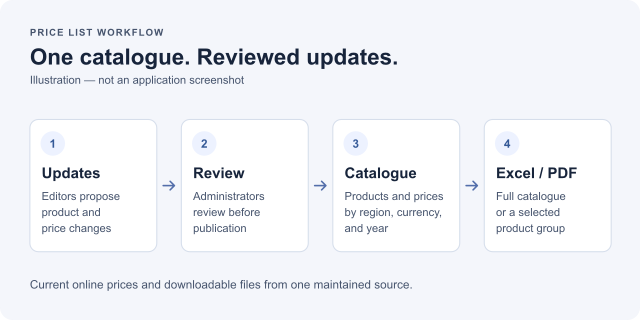
Put shared product and pricing data in one catalogue, give distributors the right regional view, and generate files from that source. Druim built this workflow for a medical-device manufacturer that maintained around 20 separate Excel price lists.
The delivered distributor portal brings together products, options, extra services, and prices by region, currency, and year. It is an information and pricing portal, without online checkout.
The starting point
The manufacturer's spreadsheets covered different regions, currencies, and product groups. A model could appear in several files, so staff had to keep repeated prices and descriptions consistent. Some models had 20 or 30 options to maintain.
Several people worked on annual updates over several months. A mid-year price change meant updating the files and sending them again. Preparing a full PDF catalogue by hand was another task the team could not manage at that scale.
What we built
- One structured catalogue. Products are organised by segment, category, product line, model, and SKU, with their options and extra services.
- Regional pricing. Each distributor sees the products and prices for their assigned region and currency. Administrators can switch between combinations to check them.
- Prices by year. Current product links show the current year's prices. Administrators can also access and export past years.
- Reviewed updates. Editors propose changes and explain them. An administrator can accept, reject, or request changes before the update reaches the live catalogue. Accepted proposals apply their specific changes to the current data.
- PDF and Excel exports. The portal generates a full catalogue or a selected segment, category, product line, or model.
- Excel price imports. Administrators can export a year's prices, edit them in Excel, and upload the updated file.
Distributors can search the catalogue, follow a product link, and check their current prices on desktop or mobile. Staff manage descriptions, images, and prices in one place.
The result
The portal was delivered and put into production. Its export workflow generates a full PDF of about 350 pages and more than 300 PDF and Excel files for one year. Those files come from the catalogue instead of being assembled individually.
The client expected the workflow to save substantial manual work. Time savings have not yet been measured, so there is no confirmed reduction in hours or cost to report.
Possible next steps
A future phase could let distributors select a model and its options, see the total price, and send a quote request to sales. Priority ERP integration was also discussed for a future phase. Neither feature is part of this delivered catalogue.
For a separate example of an ordering workflow already connected to Priority, see our distributor service portal case study.
Frequently asked questions
Can we keep using Excel after moving price lists into a portal?
Yes. This portal supports Excel for bulk price updates. Administrators can export prices for a year, edit the file, and import the changes. The catalogue also produces Excel files for distribution.
Can distributors see different prices by region and currency?
Yes. Each user has an assigned region and currency, which controls the catalogue and prices they see. Administrators can switch between combinations to review them.
How can we review price changes before publishing them?
Editors submit proposed changes with an explanation. An administrator can accept a proposal, reject it, or request changes before it affects the live catalogue.
Does a distributor portal need checkout or online payments?
No. This project provides product information, prices, search, and downloads without checkout. A configuration and quote-request workflow could be added later, with sales handling the next step.

